
Upgrading a PC can significantly improve performance, but deciding which component to replace first is not always straightforward. This is why many people who seek for better systems typically get stuck in the process. Being able to know which PC part to upgrade first can be vital in setting the right direction to where you should put your money first.
Many users immediately consider upgrading the graphics card, while others focus on the processor, memory, or storage. The right choice depends on how the computer is used and where the current system is experiencing bottlenecks.
Identify the Performance Bottleneck Before Upgrading
Before purchasing any new hardware, determine what is limiting your system’s performance. Upgrading the wrong component may provide little or no noticeable improvement. Different symptoms often point to different hardware limitations:
- Slow application launches and boot times: Upgrade to an SSD if you are still using a traditional hard drive.
- Frequent slowdowns while multitasking: Additional system RAM may be needed.
- High CPU usage during gaming or productivity tasks: A processor upgrade could provide the greatest benefit.
- Low frame rates or poor graphics performance in games: A graphics card upgrade is likely the best option.
Performance monitoring tools built into Windows or third-party software can help identify whether your CPU, GPU, RAM, or storage is consistently operating at its limits. This information allows you to prioritize upgrades based on actual system performance rather than assumptions.
What is VRAM and Why is it Important?
VRAM (Video Random Access Memory) is dedicated memory built directly into a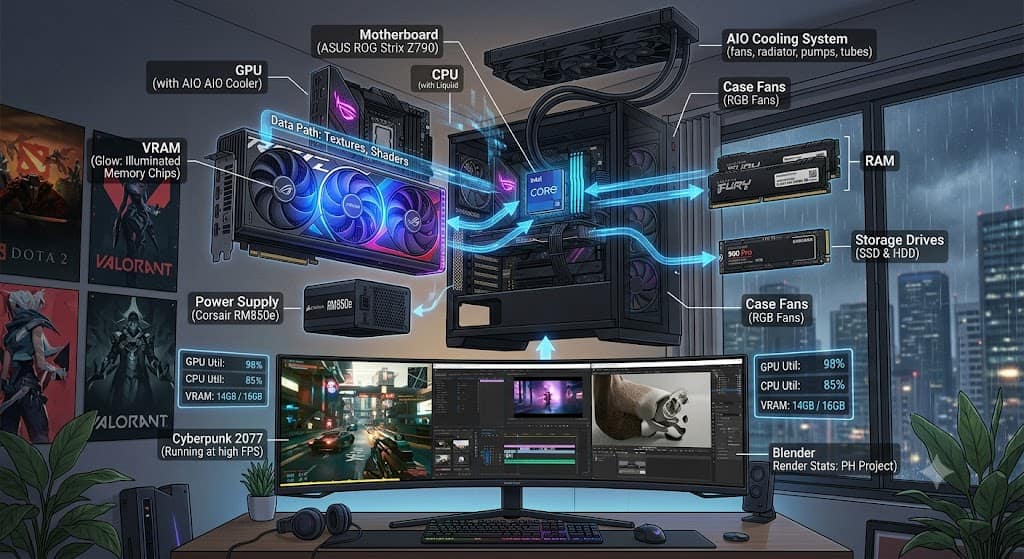 graphics card. Unlike system RAM, which is shared among all running applications, VRAM is reserved exclusively for graphics processing. The GPU uses VRAM to store essential graphical data, including:
- High-resolution textures
- Frame buffers
- Shadow maps
- 3D models
- Lighting information
- Shader data
- Geometry assets
Because VRAM is located on the graphics card itself, it provides extremely fast access to the information needed to render each frame.
When sufficient VRAM is available, the GPU can quickly retrieve graphical assets, resulting in smoother gameplay and better application performance. If VRAM becomes full, the graphics card must temporarily use the much slower system RAM through the PCI Express interface. This increases latency and often leads to performance issues.
How much VRAM Do You actually need?
There is no single VRAM capacity that is ideal for every user. The right amount depends on your workload, display resolution, and graphics settings. On the other hand, the general recommendations include:
- 1080p gaming: Moderate VRAM capacities are sufficient for most games using medium to high settings.
- 1440p gaming: Higher texture settings and modern AAA games benefit from larger VRAM capacities.
- 4K gaming: Large amounts of VRAM become increasingly important because of significantly higher memory demands.
- Creative applications: Video editing, 3D rendering, AI workloads, and CAD software often require additional VRAM for handling large projects.
Modern game engines continue increasing texture sizes and graphical complexity, making adequate VRAM increasingly important for maintaining long-term performance.
A Graphics Card Upgrade isn’t always the First Upgrade
Although upgrading a graphics card can dramatically improve gaming performance, it is not always the first component that should be replaced. For example, installing a powerful GPU into a system with an outdated processor may create a CPU bottleneck, preventing the graphics card from reaching its full potential.
Similarly, users still relying on mechanical hard drives often experience much greater improvements by upgrading to an SSD before replacing their graphics card. A balanced upgrade strategy considers the entire system:
- CPU
- GPU
- VRAM
- System RAM
- Storage
- Power supply
- Cooling
Every component contributes to overall performance. Investing heavily in one area while neglecting others can create new limitations instead of solving existing ones. For users building a new PC, selecting components that complement each other generally provides better value than maximizing a single specification.
Upgrade Planning helps Extend Your PC’s Lifespan
A well-planned upgrade strategy also prepares your computer for future software demands.
This is because many of the modern games today keep introducing larger texture, more realistic lighting, advanced physics simulations, ray tracing technologies, larger open-world environments and several other elements to improve the overall gaming experience.
Creative software is also becoming more demanding, particularly applications involving GPU acceleration.
When selecting a graphics card, consider not only current requirements but also how your needs may evolve over the next several years. Purchasing a GPU with adequate VRAM today can reduce the need for another upgrade in the near future.
Smart Upgrades Start with Understanding the Whole System
The question of which PC part to upgrade first has no universal answer. The best upgrade depends on your current hardware, your primary workloads, and the specific bottlenecks affecting performance. While a graphics card is often the most impactful upgrade for gaming, its effectiveness depends on being paired with a balanced system.
VRAM plays a critical role in that balance. It enables the GPU to store and quickly access textures, frame buffers, and other graphical assets, directly influencing image quality, frame rates, and overall responsiveness. However, VRAM should be evaluated alongside GPU performance, CPU capability, memory bandwidth, and the rest of your hardware.
By identifying your system’s weakest component and understanding how each part contributes to performance, you can make upgrade decisions that deliver meaningful improvements today while keeping your PC capable of handling tomorrow’s software and gaming demands.